

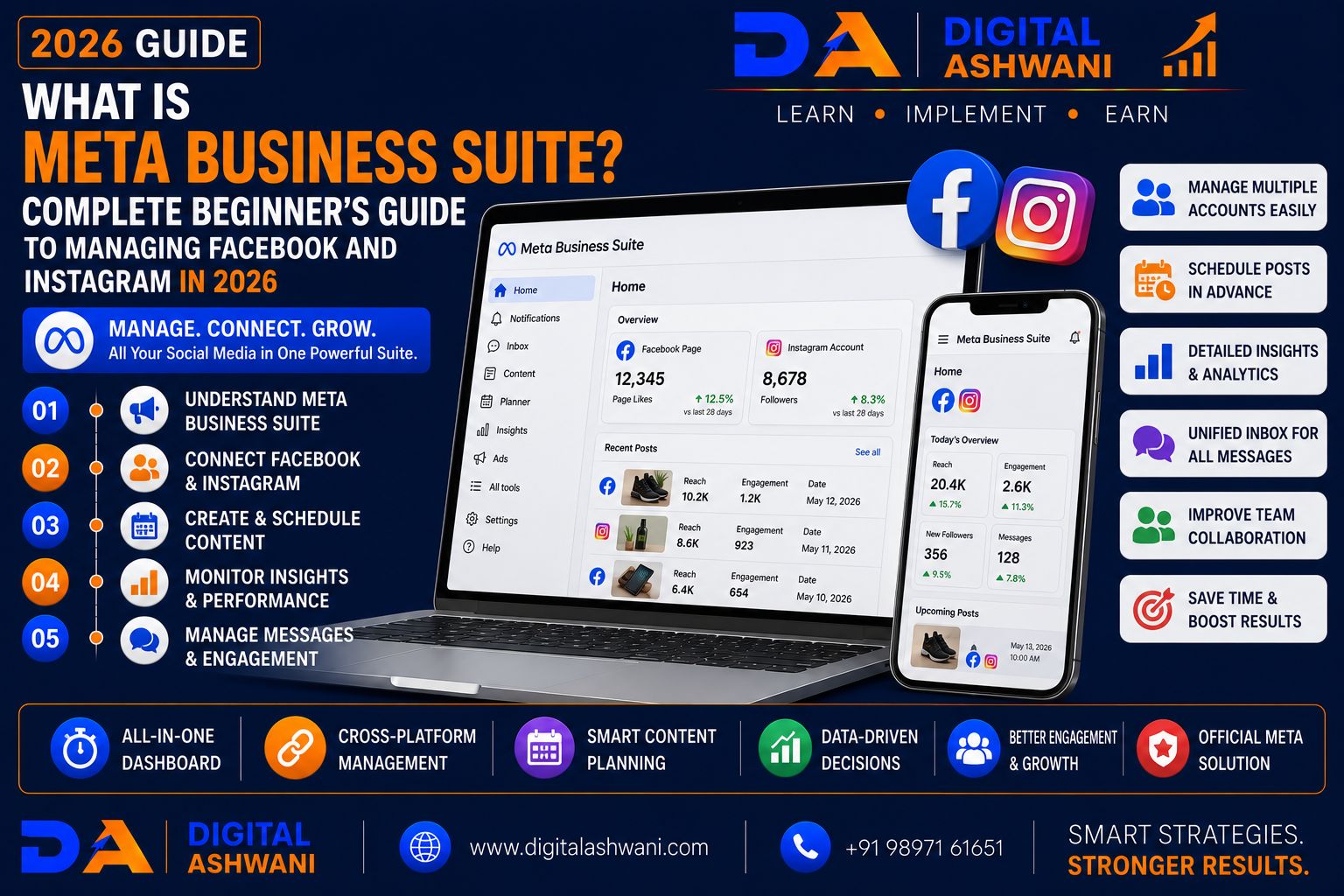
What Is Meta Business Suite?
Managing multiple social media platforms manually can quickly become time-consuming for businesses. Posting content, replying to messages, tracking performance, scheduling campaigns, and managing advertisements across Facebook and Instagram requires an organized workflow.
This is where Meta Business Suite becomes an essential marketing tool.
Meta Business Suite is a free platform provided by Meta that allows businesses to manage their Facebook Pages, Instagram Business Accounts, messages, posts, insights, and advertising activities from one centralized dashboard.
Whether you operate a local business, eCommerce store, educational institution, travel agency, restaurant, healthcare clinic, real estate company, or digital marketing agency, Meta Business Suite helps simplify daily social media management.
In this comprehensive guide by Digital Ashwani, you’ll learn 15 powerful Meta Business Suite features, how they improve marketing efficiency, and why businesses should use them in 2026.
What Is Meta Business Suite?
Meta Business Suite is a free management platform that enables businesses to manage multiple Meta properties from one place.
It supports:
- Facebook Pages
- Instagram Business Accounts
- Messages
- Comments
- Content Publishing
- Insights
- Advertising
This centralized approach improves productivity and organization.
Why Businesses Use Meta Business Suite
Businesses rely on Meta Business Suite to:
- Save Time
- Manage Multiple Accounts
- Improve Customer Communication
- Schedule Content
- Monitor Performance
- Support Advertising Campaigns
It simplifies everyday social media management.
Benefits of Meta Business Suite
Using Meta Business Suite helps businesses:
- Improve Productivity
- Schedule Posts
- Respond Faster
- Monitor Analytics
- Manage Facebook & Instagram Together
- Improve Team Collaboration
- Increase Marketing Efficiency
- Support Business Growth
15 Powerful Meta Business Suite Features
1. Manage Facebook and Instagram Together
Access both platforms from a single dashboard.
Manage:
- Posts
- Comments
- Messages
- Notifications
- Insights
Without switching between multiple applications.
2. Schedule Posts in Advance
Plan content ahead of time.
Schedule:
- Facebook Posts
- Instagram Posts
- Reels
- Stories
Consistent scheduling improves audience engagement.
3. Unified Inbox
Manage conversations from:
- Facebook Messenger
- Instagram Direct Messages
- Facebook Comments
A unified inbox improves response times.
4. View Performance Insights
Track important metrics such as:
- Reach
- Impressions
- Engagement
- Followers
- Page Growth
- Content Performance
Insights support data-driven decisions.
5. Manage Notifications Efficiently
Monitor:
- Comments
- Likes
- Mentions
- Messages
- Reviews
Centralized notifications reduce missed interactions.
6. Collaborate with Team Members
Assign appropriate access to:
- Marketing Teams
- Social Media Managers
- Agencies
- Content Creators
Role-based permissions improve workflow and account security.
7. Create and Manage Ads
Access Meta advertising tools to:
- Boost Posts
- Create Campaigns
- Monitor Performance
- Adjust Budgets
Advertising becomes easier from one dashboard.
8. Monitor Audience Growth
Track:
- New Followers
- Audience Demographics
- Engagement Trends
- Content Reach
These insights help refine your content strategy.
9. Plan Content with a Content Calendar
Maintain consistency by organizing your publishing schedule.
Plan:
- Educational Posts
- Promotional Campaigns
- Product Launches
- Seasonal Offers
- Event Announcements
- Customer Success Stories
A structured content calendar helps maintain regular audience engagement.
10. Analyze Content Performance
Review which content performs best.
Measure:
- Reach
- Engagement
- Shares
- Saves
- Clicks
- Watch Time
Use these insights to improve future content strategies.
11. Manage Multiple Business Pages
Businesses operating multiple brands or locations can manage several Facebook Pages and Instagram Business Accounts from one dashboard.
This simplifies administration and saves time.
12. Improve Customer Communication
Respond quickly to:
- Customer Questions
- Service Enquiries
- Appointment Requests
- Product Questions
- Support Messages
Faster communication improves customer satisfaction and brand trust.
13. Monitor Advertising Performance
If you run Meta Ads, monitor:
- Campaign Reach
- Clicks
- Cost Per Result
- Engagement
- Leads
- Conversions
Regular monitoring helps improve advertising ROI.
14. Use Insights to Improve Marketing
Analyze audience behavior to understand:
- Best Posting Times
- Popular Content Types
- Audience Demographics
- Device Usage
- Engagement Trends
These insights help optimize future campaigns.
15. Maintain Account Security
Protect your business assets by:
- Enabling Two-Factor Authentication
- Assigning Role-Based Access
- Reviewing User Permissions
- Removing Inactive Users
- Using Strong Passwords
Strong security protects your pages, advertising accounts, and business information.
Meta Business Suite Checklist
Before managing your business accounts, verify the following:
- Facebook Page Connected
- Instagram Business Account Connected
- Business Information Updated
- Content Calendar Planned
- Posts Scheduled
- Inbox Monitored
- Team Permissions Assigned
- Analytics Reviewed
- Advertising Tracked
- Security Enabled
Following this checklist improves daily social media management.
Common Meta Business Suite Mistakes
Posting Without a Content Plan
Random posting often leads to inconsistent engagement.
Develop a structured content calendar.
Ignoring Customer Messages
Delayed responses can reduce customer satisfaction.
Check your unified inbox regularly.
Not Reviewing Insights
Publishing without analyzing results makes it difficult to improve performance.
Use analytics to guide future decisions.
Giving Everyone Full Admin Access
Assign only the permissions required for each team member.
Limit administrative privileges for better security.
Ignoring Facebook and Instagram Together
Many businesses optimize one platform while neglecting the other.
Use Meta Business Suite to manage both consistently.
Internal Linking Suggestions (Digital Ashwani)
Strengthen your social media marketing content cluster by linking this article with:
- Complete Facebook Marketing Guide for Business Growth
- Complete Instagram Marketing Guide for Business Growth
- Instagram Marketing for Beauty Businesses
- Complete YouTube Marketing Guide for Business Growth and Brand Awareness
- How Artificial Intelligence Is Changing Social Media Marketing Strategies Today
- Social Media Marketing Tips for Interior Designers and Architects
- Website Conversion Rate Optimization Guide
- What Is Reach vs Impressions?
- What Is Organic Reach?
- Top Digital Marketing Trends in 2026
These internal links strengthen topical authority while helping readers explore Meta marketing, social media strategy, analytics, content planning, and business growth.
External Resources
For trusted Meta platform guidance, refer to:
- Meta Business Help Center
- Meta Business Suite Help
- Meta Blueprint
- Meta for Business
- Meta Developers
These official resources provide the latest guidance on Meta Business Suite, Facebook, Instagram, advertising, and business management tools.
Frequently Asked Questions
What is Meta Business Suite used for?
Meta Business Suite is used to manage Facebook Pages and Instagram Business Accounts from one dashboard. Businesses can schedule posts, reply to messages, monitor analytics, manage advertising, and collaborate with team members.
Is Meta Business Suite free?
Yes. Meta Business Suite is free to use for eligible Facebook Pages and Instagram Business Accounts. However, advertising campaigns created through the platform require a separate advertising budget.
Can I schedule Instagram posts using Meta Business Suite?
Yes. Businesses can schedule Instagram posts, Facebook posts, Stories, and Reels directly from Meta Business Suite.
Can multiple team members use Meta Business Suite?
Yes. Businesses can assign different roles and permissions to employees, agencies, or marketing teams while maintaining account security.
Is Meta Business Suite good for small businesses?
Yes. Small businesses can use Meta Business Suite to save time, improve customer communication, schedule content, analyze performance, and manage Facebook and Instagram more efficiently.
Final Thoughts
Understanding What Is Meta Business Suite is essential for businesses that want to manage Facebook and Instagram professionally. Instead of switching between multiple applications, Meta Business Suite provides a centralized platform for publishing content, responding to customers, monitoring analytics, managing advertising, and collaborating with team members.
The platform helps businesses improve efficiency, maintain consistent posting schedules, strengthen customer engagement, and make better marketing decisions through actionable insights. Whether you’re a small business owner, freelancer, digital marketer, or large organization, Meta Business Suite simplifies daily social media management while supporting long-term business growth.
As social media continues evolving, businesses that use tools like Meta Business Suite strategically will be better positioned to build stronger communities, improve customer relationships, and maximize their marketing performance.
At Digital Ashwani, we regularly publish practical guides on Social Media Marketing, Facebook Marketing, Instagram Marketing, AI Marketing, Google Ads, Analytics, SEO, and Digital Marketing to help businesses grow through modern digital strategies.
