

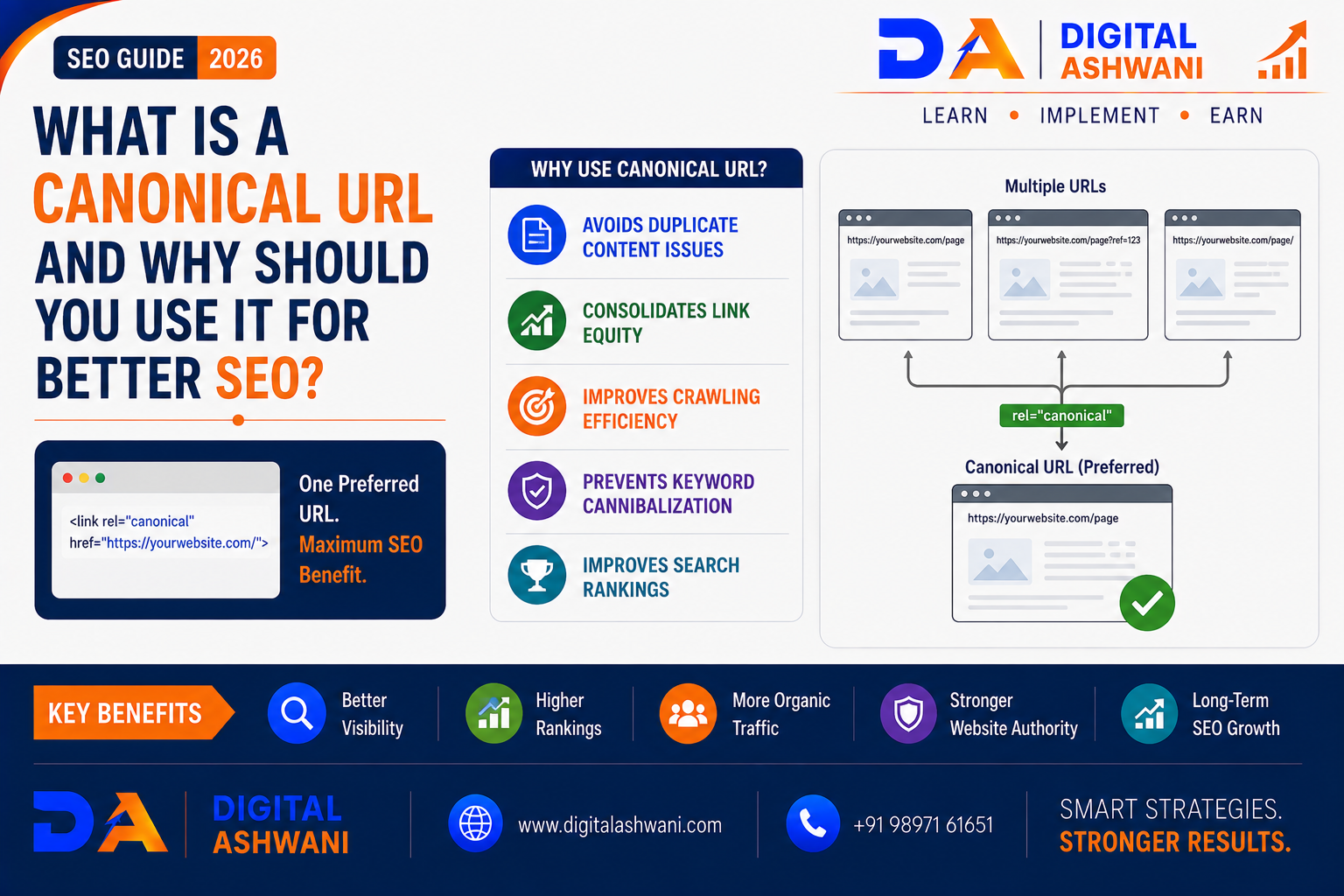
What Is a Canonical URL and Why Should You Use It for Better SEO?
Websites often have multiple URLs that display the same or very similar content.
For example, a product page might be accessible through different URLs because of:
- Tracking parameters
- Sorting options
- Filters
- Session parameters
- HTTP and HTTPS versions
- www and non-www versions
- Duplicate page paths
Search engines may have difficulty determining which URL should be treated as the primary version.
This is where a Canonical URL becomes important.
A canonical URL tells search engines which version of a page you consider the preferred or primary URL when multiple URLs contain duplicate or substantially similar content.
Canonicalization is an important part of Technical SEO because it helps search engines understand your preferred URL and consolidate signals where appropriate.
However, a canonical tag is a hint rather than an absolute command. Search engines may choose a different canonical URL when their systems determine that another version is more appropriate.
In this comprehensive guide by Digital Ashwani, you’ll learn what a canonical URL is, how canonical tags work, when to use them, common implementation mistakes, and best practices for maintaining a technically healthy website.
What Is a Canonical URL?
A canonical URL is the preferred URL that you want search engines to associate with a webpage when multiple URLs represent the same or very similar content.
For example, imagine these URLs:
https://example.com/product/shoes
https://example.com/product/shoes?color=black
https://example.com/product/shoes?source=facebook
If the underlying content is substantially the same, you may want the main product URL to be treated as the preferred version:
https://example.com/product/shoes
The canonical URL communicates this preference to search engines.
What Is a Canonical Tag?
A canonical tag is an HTML element placed in the <head> section of a webpage.
A basic canonical implementation looks like this:
<link rel="canonical" href="https://example.com/preferred-page/" />
The rel="canonical" attribute tells search engines which URL is preferred for the page.
The URL should be the correct, accessible, preferred version of the content.
Why Canonical URLs Matter for SEO
Canonicalization helps search engines understand your website’s URL structure.
It can help with:
- Duplicate Content Management
- URL Consolidation
- Crawl Efficiency
- Signal Consolidation
- Indexation Management
- Preferred URL Selection
Without clear canonical signals, search engines may have to determine which URL represents the primary version themselves.
Canonical URLs and Duplicate Content
Why Duplicate URLs Can Be a Problem
Duplicate or substantially similar content can appear through many technical mechanisms.
Common examples include:
- URL Parameters
- Product Filters
- Tracking Parameters
- Printer-Friendly URLs
- Mobile URL Variations
- HTTP/HTTPS Variations
- www/non-www Variations
A canonical tag can help communicate which version should be considered the preferred URL.
However, canonical tags should not be used as a substitute for fixing unnecessary duplicate URLs when a more appropriate technical solution exists.
When Should You Use a Canonical URL?
Similar Product URLs
eCommerce websites frequently create multiple URLs for product variations, filters, and tracking parameters.
Canonicalization can help establish the preferred product URL where appropriate.
URL Parameters
URLs such as:
/page?utm_source=facebook
/page?utm_source=email
may represent the same underlying content.
The clean page URL can often be used as the canonical version.
Syndicated or Republished Content
If content is legitimately republished across multiple URLs or websites, canonicalization may sometimes be used to indicate the preferred source, depending on the specific situation.
Self-Referencing Canonicals
Important indexable pages can often include a canonical pointing to themselves.
For example:
<link rel="canonical" href="https://example.com/seo-guide/" />
This provides a clear preferred URL signal.
Canonical URL vs Redirect
These two techniques serve different purposes.
| Canonical URL | 301 Redirect |
|---|---|
| Provides a preferred-URL hint | Sends users and crawlers to another URL |
| Both URLs may remain accessible | Old URL normally redirects |
| Useful for duplicate/similar versions | Useful when a URL has permanently moved |
| Doesn’t remove the alternate URL | Removes the alternate URL from normal user navigation |
If users should always be sent to another URL, a redirect is usually more appropriate.
If multiple URLs need to remain accessible but one should be treated as the preferred version, canonicalization may be appropriate.
How to Implement a Canonical URL
Method 1: Add Canonical HTML Tag
Add the following inside the page’s <head>:
<link rel="canonical" href="https://example.com/preferred-url/" />
Make sure the URL is:
- Correct
- Accessible
- Indexable
- The preferred version
- Consistent with your website’s URL structure
Method 2: Use WordPress SEO Plugins
If your website runs on WordPress, SEO plugins such as Rank Math can simplify canonical URL management.
You can generally configure the preferred canonical URL from the page’s SEO settings instead of manually editing HTML.
Canonical URL Best Practices
Use One Preferred Canonical URL
Avoid creating conflicting canonical signals.
Use Absolute URLs
For clarity and consistency, use the complete URL rather than relying on relative paths.
Use HTTPS
If your website uses HTTPS, the canonical should normally point to the HTTPS version.
Use the Preferred Domain Version
Be consistent with your chosen:
- www
- non-www
version.
Avoid Canonicalizing to Irrelevant Pages
The canonical should represent the same or substantially similar content.
Don’t point unrelated pages toward one another simply to consolidate URLs.
Keep Canonical URLs Indexable
A canonical should generally point to a URL that can be crawled and indexed.
Avoid pointing canonical signals to pages blocked from crawling or intentionally marked noindex.
Use Consistent Internal Links
Internal links should generally point directly to your preferred canonical URLs.
This reinforces your site’s preferred URL structure.
Canonical URLs for eCommerce Websites
eCommerce websites commonly face canonicalization challenges.
Product Filters
For example:
/store/shoes
/store/shoes?color=black
/store/shoes?size=10
Depending on the site’s SEO strategy, filtered URLs may need different canonical or indexing treatment.
Product Variations
Different product variations may require careful consideration.
Don’t automatically canonicalize every variation to the main product if each variation has unique, valuable content that deserves independent indexing.
Canonical URLs for Blogs
Blogs can also create duplicate URLs through:
- Tags
- Categories
- Pagination
- Print Versions
- Tracking Parameters
- Content Syndication
Review whether each URL should be independently indexable before adding canonical tags.
How to Check a Canonical URL
View the Page Source
Search the HTML source for:
rel="canonical"
This shows the canonical URL declared by the page.
Use Google Search Console
Google Search Console can provide information about:
- User-declared canonical
- Google-selected canonical
If Google selects a different canonical, investigate why.
Possible reasons can include:
- Duplicate Content
- Weak Canonical Signals
- Internal Linking
- Content Similarity
- Redirects
- Site Architecture
Common Canonical SEO Mistakes
Canonicalizing Every Page to the Homepage
This is usually incorrect.
Each unique page should generally have an appropriate canonical rather than pointing everything to the homepage.
Canonicalizing to a 404 Page
A canonical should not point to a page that no longer exists.
Using Canonicals on Completely Different Content
Canonicalization is not a way to transfer SEO value between unrelated pages.
Creating Conflicting Canonical Signals
If different systems specify different canonicals, search engines may ignore the preferred signal.
Using Canonical Instead of a Redirect
If an old URL has permanently moved and users should be redirected, use the appropriate redirect rather than relying solely on a canonical tag.
Canonicalizing Noindex Pages Incorrectly
Don’t assume canonical and noindex signals automatically work together as intended. Use a clear indexation strategy for each URL.
Ignoring Internal Links
If internal links consistently point to alternate URLs while the canonical points somewhere else, your signals can become inconsistent.
Canonical URL SEO Checklist
Before publishing or updating a page, check:
- Preferred URL Identified
- Canonical Tag Present Where Appropriate
- Canonical URL Is Correct
- HTTPS Version Used
- Preferred Domain Consistent
- Canonical URL Is Accessible
- Canonical URL Is Indexable
- Internal Links Use Preferred URL
- No Conflicting Canonical Signals
- Redirects Configured Correctly
- Search Console Monitored
Internal Linking Suggestions (Digital Ashwani)
Strengthen your Technical SEO content cluster by linking this article with:
- Schema Markup Guide to Improve Rich Results and Organic Click-Through Rates
- How Search Engines Crawl, Index, and Rank Websites for Better Visibility in 2026
- Top On-Page SEO Techniques to Improve Rankings and Organic Website Traffic
- Building Topical Authority Through Strategic Content Clusters and Internal Linking
- Product Page SEO Best Practices for Higher Conversions
- SEO Checklist for 2026
- How AI Is Transforming Modern SEO Strategies for Business Growth
- What Is E-E-A-T and Why Is It Important for Modern SEO?
These links create a stronger technical SEO cluster covering indexing, structured data, on-page optimization, internal linking, eCommerce SEO, and modern search.
External Resources
For authoritative canonical and indexing guidance, refer to:
- Google Search Central
- Google Search Console Help
- Schema.org Documentation
- Rank Math Documentation
Always verify current search-engine guidance because technical SEO recommendations can evolve.
Frequently Asked Questions
What is a canonical URL in SEO?
A canonical URL is the preferred URL that a website indicates to search engines when multiple URLs contain duplicate or substantially similar content.
Is a canonical URL the same as a 301 redirect?
No. A canonical provides a preferred-URL hint, while a 301 redirect sends users and crawlers from one URL to another.
Does a canonical tag improve rankings?
A canonical tag does not directly guarantee higher rankings. It helps search engines understand which URL should be treated as the preferred version of similar or duplicate content.
Should every page have a canonical tag?
Not necessarily, but many SEO implementations use self-referencing canonicals on important indexable pages. The correct approach depends on the site’s URL and indexing architecture.
Can canonical URLs solve duplicate content problems?
Canonicalization can help consolidate duplicate or substantially similar URL versions, but it should be part of a broader technical SEO strategy.
How do I check whether Google accepted my canonical?
Google Search Console can show the user-declared canonical and, where available, Google’s selected canonical. Comparing the two can help identify canonicalization issues.
Final Thoughts
A properly implemented Canonical URL strategy helps search engines understand which version of a webpage should be treated as the preferred URL when multiple URLs contain duplicate or substantially similar content.
Canonicalization is especially important for websites with:
- eCommerce Filters
- URL Parameters
- Product Variations
- Large Content Libraries
- Republished Content
- Complex Website Architectures
But canonical tags should not be treated as a shortcut for fixing every duplicate-content or indexing issue.
The strongest approach combines:
Correct Canonicals + Clean URL Structure + Consistent Internal Links + Proper Redirects + Strong Technical SEO
When these signals work together, search engines can more easily understand your website structure and preferred URLs.
At Digital Ashwani, we regularly publish practical guides on Technical SEO, Google Search, AI SEO, Local SEO, Google Ads, and Digital Marketing to help businesses build stronger and more search-friendly websites.
