

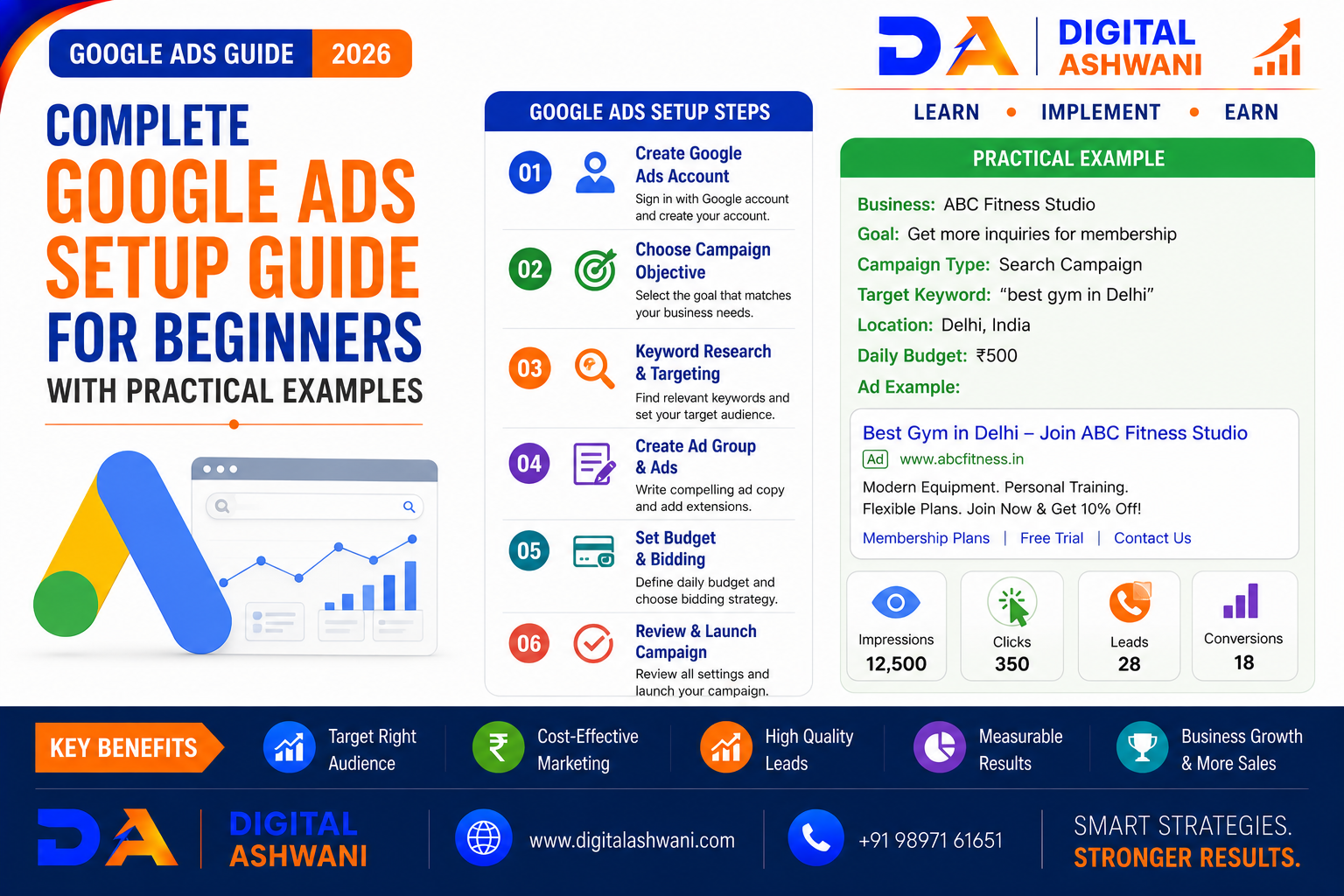
Complete Google Ads Setup Guide for Beginners With Practical Examples
Google Ads is one of the most powerful advertising platforms for businesses that want to reach people actively searching for their products or services.
Unlike many traditional advertising channels, Google Ads can connect businesses with potential customers at the moment they are searching for a solution.
For example, someone searching for “SEO agency in Delhi” may already be looking for an SEO service provider. A well-structured Google Search campaign can help a relevant business appear in front of that potential customer.
However, setting up Google Ads for the first time can feel complicated. Beginners need to understand campaign objectives, campaign types, keywords, ad groups, targeting, budgets, bidding, conversion tracking, landing pages, and performance monitoring.
Google’s current campaign creation process starts with selecting an objective and campaign type, followed by campaign settings, targeting, ad groups, ads or assets, budget, and other configuration steps.
In this complete guide by Digital Ashwani, you’ll learn how to set up Google Ads from the beginning, understand each important setting, and follow practical examples for different business situations.
What Is Google Ads?
Google Ads is Google’s online advertising platform that allows businesses to promote products and services across Google’s advertising network.
Depending on the campaign type, ads can appear on:
- Google Search
- YouTube
- Websites
- Apps
- Google Shopping
- Discover
- Other Google properties
Google provides different campaign types based on business goals and advertising requirements.
For beginners focused on generating leads from people actively searching for a service, a Search campaign is often a useful starting point because it targets users searching for relevant products or services.
How Does Google Ads Work?
Google Ads generally works through an advertising auction.
When a user searches for something relevant to an advertiser’s targeting, eligible ads can compete for placement.
Your campaign performance can be influenced by factors such as:
- Keyword Relevance
- Ad Quality
- Landing Page Experience
- Bidding
- Competition
- Targeting
- Expected Performance
The goal isn’t simply to get the highest number of clicks.
A successful campaign should attract the right users and encourage valuable actions such as calls, enquiries, purchases, or bookings.
Create a Google Ads Account
Step 1: Sign Up
Visit Google Ads and select the option to start creating an account.
Google’s current signup process asks for basic business information, campaign goals and budget, and billing details. You can also link relevant Google services such as a Google Business Profile or YouTube channel.
Step 2: Add Your Business Information
Prepare:
- Business Name
- Website URL
- Business Category
- Contact Information
- Relevant Google Accounts
Keep your business information accurate and consistent.
Step 3: Set Up Billing
Add the required billing information according to the options available in your Google Ads account.
Your actual billing setup and available payment options can vary by account and location.
Choose the Right Google Ads Campaign Type
Google Ads offers several campaign types.
Search Campaigns
Best suited for reaching people actively searching for products and services.
Example:
A dentist wants to reach people searching for:
“dentist near me”
A Search campaign can target relevant search intent.
Display Campaigns
Display campaigns can help businesses reach audiences while they browse websites and apps.
They can be useful for awareness and remarketing strategies.
Video Campaigns
Video campaigns allow businesses to advertise on YouTube and other eligible placements.
They can be useful for:
- Brand Awareness
- Product Demonstrations
- Video-Based Lead Generation
- Customer Education
Shopping Campaigns
Shopping campaigns are designed for businesses selling products online and can display product information through Google’s shopping experiences.
Performance Max
Performance Max campaigns can access multiple Google advertising channels through a single campaign and use Google’s AI-powered optimization around specified conversion goals.
Define Your Advertising Goal
Before creating your campaign, decide what you actually want to achieve.
Common goals include:
- Leads
- Sales
- Website Traffic
- Brand Awareness
- App Promotion
- Local Store Visits Where Applicable
Google recommends starting campaign setup by defining the advertising objective because the selected objective influences the campaign options and setup flow.
Practical Example: SEO Agency
Suppose Digital Ashwani wants to generate SEO leads in Delhi.
The campaign objective could be:
Goal: Leads
Campaign Type: Search
Location: Delhi
Primary Conversion: Lead Form Submission
Secondary Conversion: Qualified Phone Call
This setup gives the campaign a clear business purpose.
Set Up Campaign Settings
Campaign Name
Use a naming system that makes campaigns easy to identify.
Example:
SEO Leads | Delhi | Search
Avoid names such as:
Campaign 1
Clear naming becomes especially important when an account contains multiple campaigns.
Choose Your Location
Target the areas where you actually want customers.
For example:
- Delhi
- Noida
- Gurgaon
- Ghaziabad
Don’t target a large geographic area simply because it seems attractive if your business cannot serve those customers.
Choose Language
Select languages relevant to your target audience and campaign.
Set Your Daily Budget
Google Ads lets you set a daily budget at the campaign level.
For example:
Monthly Budget: ₹30,000
A simple starting calculation is:
₹30,000 ÷ 30 ≈ ₹1,000 per day
This is only a planning estimate. Actual daily spending and monthly billing can vary according to Google’s advertising system and campaign settings.
Perform Keyword Research
Keywords determine the searches that can make your ads eligible to appear.
For an SEO agency, potential keywords could include:
- SEO Agency Delhi
- SEO Company Delhi
- SEO Services Delhi
- Local SEO Agency Delhi
- SEO Expert Delhi
Avoid adding every keyword you can find.
Focus on terms that match your actual services and customer intent.
Understand Search Intent
High-Intent Keywords
Examples:
- Hire SEO Agency Delhi
- SEO Company Delhi
- Local SEO Services Delhi
- Google Ads Agency Delhi
These can indicate stronger commercial intent.
Informational Keywords
Examples:
- What Is SEO?
- SEO Tutorial
- How Does SEO Work?
These may be useful for content marketing but may not be suitable for a lead-generation Search campaign.
Choose Keyword Match Types
Google Ads provides match types that control how closely a user’s search needs to relate to your keyword.
Common options include:
- Exact Match
- Phrase Match
- Broad Match
The right mix depends on campaign objectives, conversion data, account maturity, and how much control versus reach you need.
Create Well-Structured Ad Groups
Don’t place completely unrelated keywords into one ad group.
Instead, group closely related keywords.
Example
Campaign: SEO Leads | Delhi | Search
Ad Group: SEO Agency
Keywords:
- SEO Agency Delhi
- SEO Company Delhi
- SEO Services Delhi
Ad Group: Local SEO
Keywords:
- Local SEO Delhi
- Google Maps SEO Delhi
- Local SEO Services Delhi
This structure makes it easier to create relevant ads for each search theme.
Write Effective Google Search Ads
Google Search campaigns use responsive search ads.
Your ad messaging should closely match the user’s search intent and the landing page.
Google recommends using multiple ads in each ad group and making the messaging directly relevant to what customers want.
Practical Example
Keyword: SEO Agency Delhi
Headline Ideas:
- SEO Agency in Delhi
- Grow Your Google Rankings
- Generate More Qualified Leads
Description Example:
Get practical SEO strategies designed to improve search visibility and generate qualified business enquiries. Contact our team today.
Keep your claims accurate and avoid unrealistic guarantees.
Add Relevant Ad Assets
Ad assets can provide additional information and increase the usefulness of your ads.
Depending on eligibility and campaign setup, examples include:
- Sitelinks
- Callouts
- Structured Snippets
- Call Assets
- Location Assets
- Lead Form Assets
Google recommends using relevant assets as part of campaign setup.
Set Your Google Ads Budget
Your budget should be connected to your business economics.
Example for a Local Service Business
Suppose:
Daily Budget: ₹1,000
Estimated Monthly Planning Budget: ₹30,000
If the campaign generates:
50 leads
then the simple average cost per lead would be:
₹30,000 ÷ 50 = ₹600
This is an illustrative example, not a guaranteed Google Ads result.
The important point is to evaluate whether the leads are valuable enough to justify the advertising cost.
Choose a Bidding Strategy
Your bidding strategy determines how Google optimizes your bids.
Depending on your goal and campaign setup, options can include:
- Maximize Clicks
- Maximize Conversions
- Target CPA
- Target ROAS
- Other available strategies
Google recommends conversion-focused automated bidding such as Maximize Conversions when appropriate, and conversion tracking is required to make meaningful use of conversion-based optimization.
Set Up Conversion Tracking
Conversion tracking is one of the most important parts of Google Ads setup.
Google defines conversions as valuable actions such as purchases, sign-ups, phone calls, or other actions you choose to measure.
Website Conversions
Track actions such as:
- Contact Form Submission
- Quote Request
- Booking
- Purchase
- Newsletter Signup
Phone Conversions
For businesses that depend on calls, phone conversions can be important.
For example:
Ad Click → Phone Call → Qualified Lead
Google Ads supports phone call conversion measurement where configured.
Lead Quality
Don’t stop at counting leads.
If possible, distinguish between:
Total Leads → Qualified Leads → Sales
This helps you understand the actual business value of the campaign.
Optimize Your Landing Page
Your advertisement and landing page should provide a consistent experience.
Google specifically recommends making sure that the landing page matches the ad and that users can find what they expected after clicking.
A Good Lead Generation Landing Page Should Include
- Clear Headline
- Service Benefits
- Relevant Information
- Trust Signals
- Testimonials Where Appropriate
- Strong CTA
- Simple Contact Form
- Mobile-Friendly Design
- Fast Loading Speed
Practical Example: Dentist Google Ads Campaign
Suppose a dental clinic wants more appointment requests.
Campaign
Name: Dentist Leads | Delhi | Search
Goal: Leads
Location: Delhi
Budget: ₹1,500/day
Ad Group
Dental Clinic
Keywords might include:
- Dentist Delhi
- Dental Clinic Delhi
- Dentist Near Me
- Dental Consultation Delhi
Ad
Headline:
Professional Dental Care in Delhi
Description:
Book a dental consultation with our clinic. Explore available treatments and schedule your appointment today.
Landing Page
The landing page should clearly show:
- Treatments
- Dentist Information
- Clinic Location
- Appointment CTA
- Contact Number
- Consultation Information
Practical Example: eCommerce Google Ads Campaign
Suppose an online store sells running shoes.
The campaign structure could include:
Campaign: Running Shoes | Search
Ad Group: Running Shoes
Keywords:
- Buy Running Shoes
- Running Shoes Online
- Best Running Shoes
The landing page should show the relevant products rather than sending users to a generic homepage.
For product-focused advertising, Shopping or Performance Max may also be considered depending on the business setup and goals.
Launch Your Campaign
Before publishing, review:
- Campaign Objective
- Campaign Type
- Location
- Language
- Budget
- Bidding
- Keywords
- Match Types
- Negative Keywords
- Ad Copy
- Assets
- Landing Page
- Conversion Tracking
- Billing
Google Ads provides notifications during campaign creation that can highlight settings or issues that could affect performance or prevent publishing.
Monitor Your Campaign After Launch
Don’t launch your campaign and immediately make major changes every few hours.
Give the campaign enough data to evaluate performance while monitoring important signals.
Track:
- Impressions
- Clicks
- CTR
- CPC
- Conversions
- Conversion Rate
- Cost Per Conversion
- Search Terms
- Lead Quality
- Conversion Value Where Applicable
Google recommends using conversion data and related performance metrics to guide optimization decisions.
Use the Search Terms Report
The Search Terms Report shows searches that triggered your ads.
It can help you identify:
- Relevant Searches
- New Keyword Opportunities
- Irrelevant Searches
- Negative Keyword Opportunities
Google specifically recommends reviewing search terms to distinguish useful traffic from irrelevant traffic.
Add Negative Keywords
Negative keywords help prevent ads from showing for searches that aren’t relevant to your business.
For example, an SEO agency that sells professional services may consider excluding searches such as:
- Free
- Jobs
- Internship
- Course
But don’t add negatives blindly. Review actual search data first and consider the context of each query.
Common Google Ads Mistakes Beginners Should Avoid
Starting Without a Clear Goal
Don’t run ads simply because competitors are running them.
Using Too Many Unrelated Keywords
Keep ad groups focused.
Sending All Traffic to the Homepage
Send users to the most relevant landing page available.
Ignoring Conversion Tracking
Without conversion tracking, it’s difficult to understand which campaigns and keywords are producing valuable actions.
Choosing Bidding Based Only on Low CPC
A cheap click isn’t necessarily a valuable click.
Ignoring Search Terms
Search terms can reveal both valuable opportunities and wasted spend.
Making Too Many Changes Too Quickly
Use data to guide optimization rather than constantly changing campaigns without enough evidence.
Beginner Google Ads Setup Checklist
Before launching your first campaign, check:
- Google Ads Account
- Business Information
- Campaign Objective
- Campaign Type
- Location Targeting
- Language
- Daily Budget
- Bidding Strategy
- Keyword Research
- Match Types
- Ad Groups
- Search Ads
- Ad Assets
- Negative Keywords
- Landing Page
- Conversion Tracking
- Billing
- Analytics
- Search Terms Monitoring
Internal Linking Suggestions (Digital Ashwani)
Strengthen the Google Ads content cluster by linking this article with:
- Complete Google Search Ads Campaign Setup Guide for Better Lead Generation
- Best Google Search Campaign Bidding Strategies Explained
- Google Ads Terminology Every Digital Marketer Should Understand Before Advertising
- How Artificial Intelligence Is Changing Google Ads Campaign Optimization
- PPC Audit Checklist Every Business Should Complete Before Scaling Campaigns
- Google Ads Strategy for Doctors to Increase Patient Appointments
- What Is Cost Per Click (CPC)? Complete Guide to Reduce CPC and Improve ROI
- Meta Ads Optimization Tips for Lower Cost Per Lead
These internal links create a strong topical cluster around Google Ads setup, Search campaigns, PPC, bidding, CPC, optimization, and lead generation.
External Resources
For the latest Google Ads setup instructions and platform changes, refer to official resources:
- Google Ads Help
- Google Ads Campaign Setup Guide
- Google Ads Search Campaign Guide
- Google Ads Conversion Tracking Guide
Google regularly updates campaign workflows, features, bidding options, and AI-powered tools, so always check the latest official documentation before implementing a campaign.
Frequently Asked Questions
Is Google Ads difficult for beginners?
The basic setup is manageable, but profitable advertising requires understanding targeting, keywords, ads, landing pages, conversion tracking, bidding, and ongoing optimization.
Which Google Ads campaign should beginners start with?
For businesses that want to reach people actively searching for their products or services, a Search campaign can be a practical starting point. Google describes Search campaigns as a way to reach users actively searching for relevant products and services.
How much money do I need to start Google Ads?
There is no single minimum budget that works for every business. Your budget should depend on keyword costs, competition, conversion rates, customer value, and the amount of data you need to make informed decisions.
Should I use Maximize Clicks or Maximize Conversions?
It depends on your campaign objective and available conversion data. Maximize Clicks is focused on generating clicks, while conversion-focused bidding is designed around conversions. Google recommends conversion-based Smart Bidding when appropriate and notes that conversion tracking is needed for conversion-focused strategies.
How long does Google Ads take to produce results?
Ads can begin receiving traffic after launch, but meaningful optimization requires enough data to evaluate clicks, conversions, search terms, lead quality, and costs. The timeline varies significantly by industry, budget, competition, and campaign quality.
Do I need a website to run Google Ads?
Not necessarily for every campaign type or objective, but many lead-generation and sales campaigns benefit from a dedicated, relevant landing experience. Google also supports conversion actions beyond website purchases, including phone calls and other measurable actions.
Can Google Ads guarantee leads or sales?
No. Google Ads can provide access to relevant audiences, but results depend on factors such as demand, competition, targeting, offer, ad quality, landing page experience, budget, and conversion process.
Final Thoughts
Setting up Google Ads successfully isn’t about simply creating an account, choosing a few keywords, and launching an advertisement.
A strong campaign starts with:
Clear Goal + Right Campaign Type + Relevant Keywords + Strong Ads + Relevant Landing Page + Conversion Tracking + Continuous Optimization
For beginners, the best approach is to start with a clear business objective, build a focused campaign structure, track meaningful conversions, and use actual campaign data to improve performance.
Don’t focus only on clicks or impressions. Focus on whether Google Ads is generating valuable actions such as qualified leads, sales, bookings, calls, or purchases.
Google’s platform and campaign options continue to evolve, so keep learning and review official documentation as features change.
At Digital Ashwani, we regularly publish practical guides on Google Ads, SEO, PPC, AI Marketing, Social Media Marketing, Local SEO, and Digital Marketing to help businesses build stronger online visibility and generate sustainable growth.
