

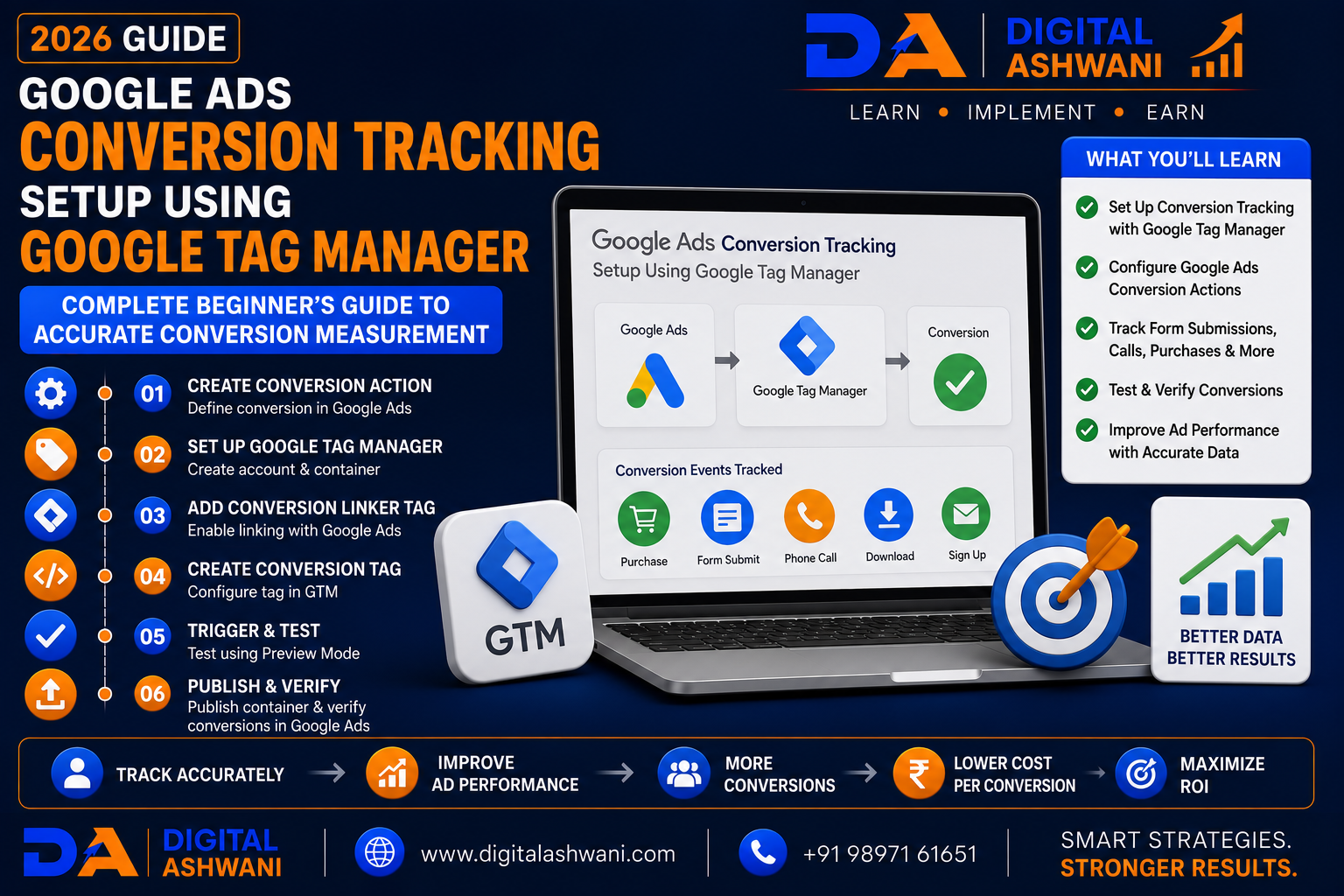
Google Ads Conversion Tracking Setup Using Google Tag Manager
Running Google Ads without conversion tracking is like driving without a destination. You may receive clicks and website traffic, but you won’t know whether your advertising budget is generating leads, sales, phone calls, or business growth.
That’s why Google Ads Conversion Tracking is one of the most important components of every successful PPC campaign.
Instead of manually adding tracking code to your website, businesses can use Google Tag Manager (GTM) to manage tracking tags efficiently. GTM simplifies implementation, reduces dependency on developers for routine tag updates, and makes conversion tracking easier to maintain.
Whether you operate a local business, eCommerce store, coaching institute, dental clinic, law firm, SaaS company, or service-based business, accurate conversion tracking helps you optimize campaigns using real performance data.
In this comprehensive guide by Digital Ashwani, you’ll learn 15 proven steps and best practices for setting up Google Ads Conversion Tracking using Google Tag Manager in 2026.
What Is Google Ads Conversion Tracking?
Google Ads Conversion Tracking measures valuable actions users perform after clicking your advertisements.
Examples include:
- Contact Form Submission
- Product Purchase
- Phone Call
- Appointment Booking
- Newsletter Signup
- Quote Request
- Download
- WhatsApp Click
Tracking these actions helps advertisers understand campaign performance beyond clicks.
What Is Google Tag Manager?
Google Tag Manager (GTM) is a free tag management system that allows you to deploy and manage marketing and analytics tags without editing website code for every change.
Using GTM, businesses can manage:
- Google Ads Tags
- Google Analytics 4
- Meta Pixel
- Custom Events
- Conversion Tracking
- Third-Party Scripts
A centralized tag management system improves efficiency and organization.
Why Conversion Tracking Matters
Accurate conversion tracking helps businesses:
- Measure ROI
- Improve Campaign Performance
- Optimize Bidding
- Reduce Wasted Ad Spend
- Understand Customer Behavior
- Improve Lead Quality
- Increase Conversions
- Make Better Marketing Decisions
Without reliable tracking, campaign optimization becomes much more difficult.
15 Proven Google Ads Conversion Tracking Setup Steps
1. Install Google Tag Manager
Begin by installing the GTM container on every page of your website.
Verify installation using:
- Google Tag Assistant
- GTM Preview Mode
Correct installation is the foundation of accurate tracking.
2. Link Google Ads with GTM
Create your conversion action inside Google Ads.
Record:
- Conversion ID
- Conversion Label
These values are required when configuring your GTM conversion tag.
3. Define Your Conversion Goals
Before creating tags, determine which actions you want to measure.
Examples include:
- Lead Form Submission
- Purchase
- Phone Call
- Appointment Booking
- Contact Form
- Newsletter Signup
Clearly defined goals improve campaign optimization.
4. Create Conversion Tags
Inside GTM, create a Google Ads Conversion Tracking tag.
Configure:
- Conversion ID
- Conversion Label
- Trigger
Each conversion should have an appropriate trigger.
5. Configure Triggers
Triggers determine when conversion tags fire.
Examples:
- Form Submission
- Button Click
- Thank You Page
- Purchase Confirmation
- Call Button Click
Accurate triggers prevent false conversions.
6. Test Using Preview Mode
Always verify your setup before publishing.
Check that:
- Tags Fire Correctly
- Triggers Work
- Variables Populate
- No Duplicate Tags Exist
Testing reduces implementation errors.
7. Publish Your GTM Container
Once testing is complete:
- Submit Changes
- Publish Container
- Verify Live Tracking
Publishing activates your conversion tracking configuration.
8. Verify Conversion Recording
After publishing, perform a real or test conversion.
Confirm the conversion appears correctly inside:
- Google Ads
- Google Tag Manager
- Google Analytics 4
Successful verification ensures accurate campaign measurement.
9. Enable Enhanced Conversions
Enhanced Conversions improve measurement accuracy by securely using first-party customer data (such as hashed email addresses) when users complete conversions.
Benefits include:
- Better Conversion Accuracy
- Improved Attribution
- Stronger Smart Bidding Signals
- Better Cross-Device Measurement
- More Reliable Reporting
Enhanced Conversions can help recover conversions that might otherwise be missed.
10. Integrate Google Analytics 4
Connect Google Ads with Google Analytics 4 (GA4) to gain deeper insights into user behavior.
Benefits include:
- Shared Conversion Data
- Audience Building
- Cross-Channel Reporting
- User Journey Analysis
- Better Campaign Optimization
GA4 and Google Ads together provide a more complete view of marketing performance.
11. Track Multiple Conversion Actions
Different businesses have different success metrics.
Track actions such as:
- Contact Form Submissions
- Phone Calls
- Purchases
- Appointment Bookings
- Quote Requests
- Newsletter Signups
- WhatsApp Clicks
- PDF Downloads
Tracking multiple conversions provides a better understanding of customer behavior.
12. Monitor Tag Performance Regularly
Tracking should be reviewed after every major website update.
Check for:
- Broken Tags
- Missing Triggers
- Duplicate Conversions
- JavaScript Errors
- Trigger Failures
- Incorrect Variables
Routine audits help maintain accurate reporting.
13. Use AI and Smart Bidding
Google Ads Smart Bidding depends on high-quality conversion data.
Accurate tracking improves:
- Target CPA
- Target ROAS
- Maximize Conversions
- Maximize Conversion Value
- Performance Max Campaigns
Better conversion data enables Google’s AI to make more informed bidding decisions.
14. Test Every Website Change
Website updates may unintentionally affect tracking.
After making changes, test:
- Contact Forms
- Purchase Flows
- Buttons
- Thank You Pages
- GTM Triggers
- Google Ads Tags
Regular testing helps prevent missing or inaccurate conversion data.
15. Continuously Optimize Your Tracking Setup
Conversion tracking should evolve alongside your website and marketing strategy.
Regularly:
- Add New Conversion Actions
- Remove Obsolete Tags
- Review GTM Workspace
- Update Triggers
- Improve Naming Conventions
- Analyze Conversion Reports
Continuous optimization ensures your tracking remains reliable over time.
Google Ads Conversion Tracking Checklist
Before considering your setup complete, verify the following:
- GTM Installed Correctly
- Google Ads Linked
- Conversion Actions Created
- Conversion ID & Label Added
- Triggers Configured
- Preview Mode Tested
- GTM Container Published
- Enhanced Conversions Enabled
- GA4 Integrated
- Live Conversion Testing Completed
Following this checklist helps ensure accurate campaign measurement.
Common Google Tag Manager Mistakes
Publishing Without Testing
Always use GTM Preview Mode before publishing changes.
Testing helps identify issues before they affect live campaigns.
Using Incorrect Triggers
Poorly configured triggers may fire too often—or not at all—leading to inaccurate conversion reporting.
Creating Duplicate Tags
Duplicate conversion tags can inflate conversion counts and distort campaign performance.
Review your GTM container regularly to avoid duplication.
Ignoring Website Updates
Website redesigns, new forms, or page changes can impact tracking.
Retest your setup after significant updates.
Not Monitoring Conversion Reports
Tracking implementation is only the beginning.
Review conversion reports regularly to ensure data remains accurate and actionable.
Internal Linking Suggestions (Digital Ashwani)
Strengthen your Google Ads, GTM, and analytics content cluster by linking this article with:
- Complete Beginner’s Guide to Google Ads for Small Business Owners
- Complete Google Search Ads Campaign Setup Guide for Better Lead Generation
- Complete Performance Max Campaign Guide for Small Business Growth
- Complete Remarketing Strategy to Recover Lost Website Visitors Successfully
- Ultimate Analytics and Tracking Guide for Long-Term Business Growth
- How to Create Custom Events in Google Analytics 4 Without Coding
- What Is Looker Studio and How Does It Improve Marketing Reporting?
- How to Increase Website Conversion Rates Using Data-Driven Optimization Methods
- What Are Negative Keywords?
- What Is First-Party Data?
These internal links strengthen topical authority while helping readers explore related Google Ads, Google Tag Manager, GA4, analytics, conversion tracking, and performance optimization topics.
External Resources
For trusted implementation guidance, refer to:
- Google Tag Manager Help Center
- Google Ads Help Center
- Google Analytics Help Center
- Google Tag Assistant
- Google Skillshop
These official resources provide current recommendations for GTM implementation, conversion tracking, Analytics integration, and campaign optimization.
Frequently Asked Questions
Why should I use Google Tag Manager for Google Ads Conversion Tracking?
Google Tag Manager simplifies tag deployment and management, making it easier to update tracking without editing website code for every change.
Can I track multiple conversions with GTM?
Yes. GTM allows you to track multiple conversion actions such as purchases, lead forms, phone calls, appointment bookings, downloads, and button clicks.
Do I need Google Analytics 4 with Google Ads Conversion Tracking?
While Google Ads Conversion Tracking works independently, integrating GA4 provides deeper reporting, audience insights, and a better understanding of the customer journey.
What are Enhanced Conversions?
Enhanced Conversions use securely processed first-party data to improve conversion measurement accuracy and strengthen campaign optimization.
How often should I test my GTM setup?
Test your tracking whenever you publish GTM changes, redesign your website, modify forms, or add new conversion actions. Regular audits also help ensure ongoing accuracy.
Final Thoughts
Implementing Google Ads Conversion Tracking Setup Using Google Tag Manager is essential for businesses that want to measure advertising performance accurately and make data-driven decisions. Without reliable conversion tracking, campaign optimization becomes difficult because clicks alone do not reveal whether your marketing is generating meaningful business results.
By combining Google Tag Manager, Google Ads, Google Analytics 4, Enhanced Conversions, and well-configured triggers, businesses can build a robust measurement framework that supports smarter bidding, improved attribution, and better return on advertising investment.
Rather than treating conversion tracking as a one-time technical task, review and optimize it regularly as your website and marketing campaigns evolve. Accurate data is the foundation of successful Google Ads optimization and long-term business growth.
At Digital Ashwani, we regularly publish practical guides on Google Ads, Google Analytics 4, Google Tag Manager, SEO, AI Marketing, Conversion Optimization, and Digital Marketing to help businesses improve campaign performance through reliable measurement and informed decision-making.
