

Introduction
Google Search Console continues to evolve, and one of its latest features is Platform Properties. This update allows website owners, SEO professionals, and digital marketers to monitor the search performance of supported social media platforms from a single dashboard.
However, many users are facing confusion because the feature is not available for every account yet. In this guide, you’ll learn what Platform Properties are, how to add your social media accounts, and how to solve the most common problems.
What Are Platform Properties?
Platform Properties are a new feature in Google Search Console that helps you monitor the visibility of supported social media platforms in Google Search.
Instead of tracking only your website, you can also analyze how users discover your content on platforms such as:
- YouTube
- TikTok
- X (formerly Twitter)
This gives marketers a better understanding of their overall search presence.
Benefits of Platform Properties
Using Platform Properties can help you:
- Track search performance for supported social media profiles.
- Understand where your organic traffic is coming from.
- Compare website and platform performance.
- Improve your content strategy using search insights.
- Measure the visibility of your brand across multiple platforms.
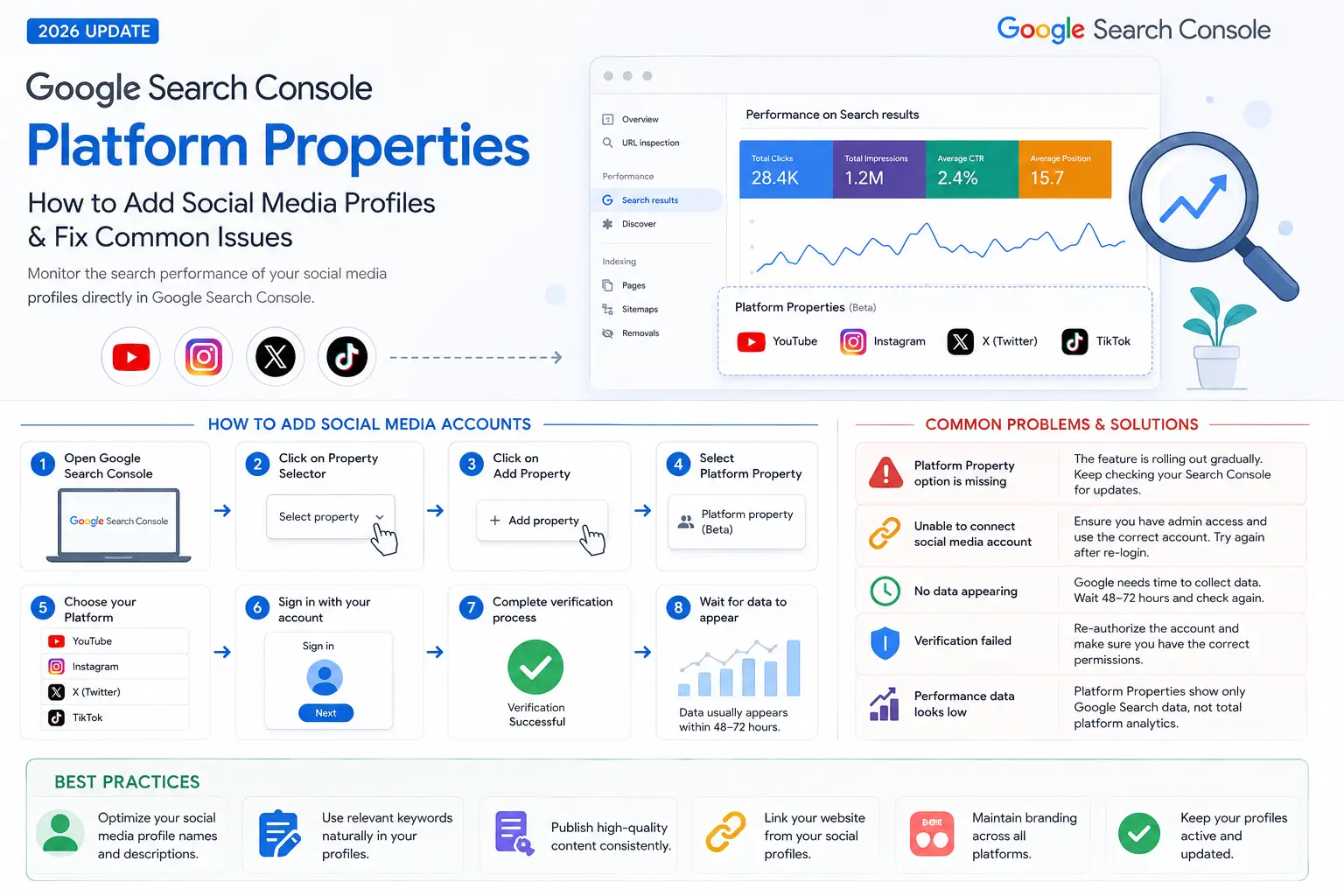
How to Add Social Media Accounts
If the feature is available in your account, follow these steps:
- Open Google Search Console.
- Click the Property Selector.
- Select Add Property.
- Choose Platform Property.
- Select the supported platform.
- Sign in with your account.
- Complete the verification process.
- Wait for Google to collect and display performance data.
Common Problems and Solutions
Problem 1: Platform Property Option Is Missing
Reason
Google is rolling out this feature gradually, so it is not yet available for every account.
Solution
- Wait for the rollout to reach your account.
- Keep your Search Console account updated.
- Check periodically for new features.
Problem 2: Unable to Connect Social Media Account
Reason
The selected account may not have the required permissions, or the platform is not supported yet.
Solution
- Log in using the correct account.
- Ensure you have administrative access.
- Try reconnecting after signing out and back in.
Problem 3: No Data Appearing
Reason
Google needs time to collect search performance data.
Solution
- Wait 48–72 hours after connecting.
- Continue publishing content regularly.
- Check again after Google processes the data.
Problem 4: Verification Failed
Reason
Authentication errors or permission issues.
Solution
- Verify that you’re using the correct account.
- Reauthorize the platform connection.
- Remove and add the property again if necessary.
Problem 5: Performance Data Looks Low
Reason
Platform Properties only report Google Search performance, not total platform analytics.
Solution
Compare the data with each platform’s native analytics instead of expecting identical numbers.
SEO Best Practices
To maximize the value of Platform Properties:
- Optimize your social media profile names and descriptions.
- Use relevant keywords naturally.
- Publish high-quality content consistently.
- Maintain branding across all platforms.
- Link your website from your social profiles.
- Keep your profiles active and updated.
Frequently Asked Questions
Is Platform Properties available for everyone?
No. Google is releasing the feature gradually.
Does it replace website properties?
No. It complements your existing website property by providing additional insights.
Can I connect every social media platform?
Only supported platforms can currently be added.
Is the feature free?
Yes. It is included with Google Search Console.
Conclusion
Google Search Console Platform Properties is an exciting step toward unified search performance reporting. While many users are still waiting for access, the feature will become increasingly valuable for SEO professionals and digital marketers who want to measure their brand’s visibility beyond traditional websites.
If the option is not yet available in your account, don’t worry. Google is rolling it out in phases, so keep checking your Search Console regularly. Once available, connecting your supported social media profiles can provide deeper insights into how people discover your content through Google Search.
